Skytorial and Linkedtorial 2: Your Profile on GitHub
By Yanina Bellini Saibene in English Open Data Open Science 100DaysToOffLoad2025 RSE GitHub
August 31, 2025
🧵 Skytorial | Linkedtorial 2 – Your profile on GitHub
🌟 The first thing on GitHub is your profile: your cover letter to the academic and scientific world. This is how colleagues, collaborators, and potential reviewers of your projects find you.
Let’s create it step by step 👇
📝 Open an account on GitHub:
- Go to 👉 github.com
- Click on Sign up
- Choose a short, recognizable, and professional username💡Tips: use the same username you have on other platforms. Many people just use their name.
- Enter a valid email address and password.
- Confirm your registration.
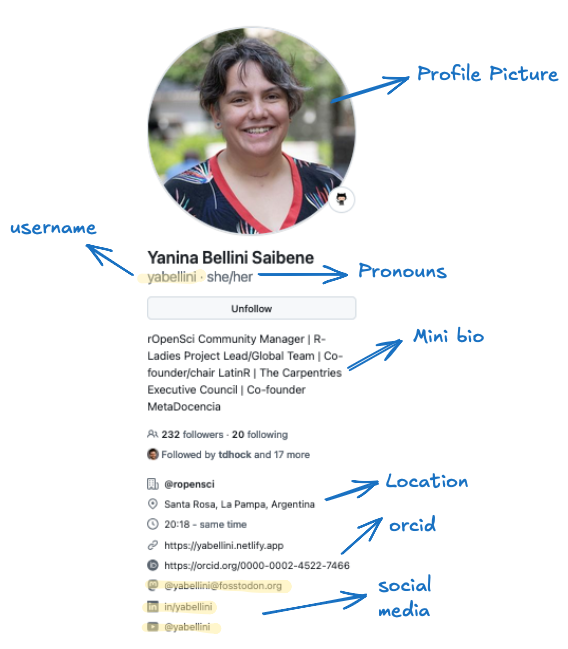
🖼️ Customize your profile:
- Once you have logged in, click on your avatar (top right) → Your Profile.
- Upload a clear photo (yes, it’s important!).
- Write a bio: briefly describe your research or academic role.
- Add your institutional affiliation.
📌 Link your work: In your profile, you can add:
- Your personal or laboratory page
- ORCID profile (highly recommended ✅)
- Academic LinkedIn/Bluesky/Mastodon
This makes it easier for others to connect your work in different places.
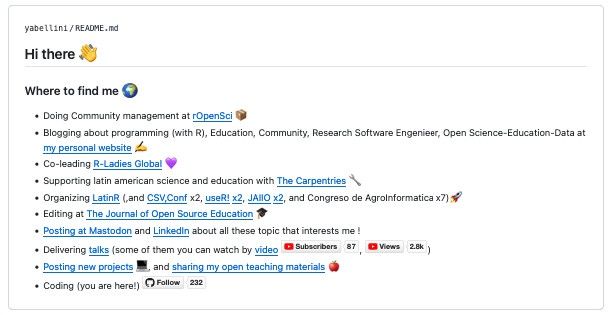
📂 Your profile README (optional but powerful):
- Your profile is a special repo!
- If you create a repo named exactly as your username, GitHub will display its README on your profile. 🤩
- There, you can tell people who you are, your interests, links, papers, CV, and anything else you want to highlight.
🔍 Tips for an attractive and useful profile:
- Be clear and concise.
- Showcase your research topics.
- Highlight your projects.
- Include contact details.
- Update it regularly (like your resume).
💡Extra Tip: look at other profiles to see what you like and how they showcase their work.
🌐 Follow other users: GitHub is also a social network. You can:
👀 Follow colleagues, labs, and groups. ⭐ Star repositories that you find useful. 🍴Create forks of projects (make your own copy).
This way, your profile will reflect your interests.
🎉 That’s all for this linkedtorial!
Now you have:
- Your GitHub account
- A profile that reflects your academic identity
- A way to connect with other users
- Optional: a README to introduce yourself 👉 Do you already have a GitHub profile, or are you going to create 1 right now?
Next 👉 Repositories!
- Posted on:
- August 31, 2025
- Length:
- 2 minute read, 358 words
- Categories:
- English Open Data Open Science 100DaysToOffLoad2025 RSE GitHub